
- Prerequisites
- Firewall and Network Requirements
- Microsoft Edge Download Block
- SQL Server Authentication Setup for IT Administrators
- Antivirus and Endpoint Security Exclusions
- SQL Server Tools
- Install or Upgrade SQL Server Express
- Install or Upgrade SQL Server Management Studio
- Database Connection Setup
- Database Creation
- Database Restore
- Transfer Settings from Database
- Connecting a Second Computer
- A Tour of the Main Window
- The Menus
- The Button Row
- The Main Data Grid
- The Summary Section
- Banners and Badges
- The Options Window
- Store Configuration
- Miscellaneous
- Export Options
- Vendor Settings
- POS / Connections Tabs
- Background Service
- AI Assistant (Experimental)
- How POS Import Works
- Supported Point-of-Sale Systems
- Data Import Workflows
- RockSolid POS Import
- Epicor Eagle FTP Import
- Epicor MySQL Compass Import
- Transact POS Import
- Paladin POS Import
- Falcon POS Import
- Spruce POS Import
- Bistrack POS Import
- RockSolid Max POS Import
- ECS POS Import
- Prosperity POS Import
- Catalyst POS Import
- Westlake POS Import
- MI9 POS Import
- AS/400 POS Import
- CounterWorks POS Import
- Dimension POS Import
- PacSoft POS Import
- ProStix POS Import
- Sympac POS Import
- Propello POS Import
- EagleVision POS Import
- MySQL/Compass Connection Configuration
- ECI VPN Requirement (Spruce, RockSolid MAX)
- Propello POS Integration Guide
- Troubleshooting: Epicor Import Brought In 0 SKUs
- PACE POS Import
- Advantage POS Import
- General Store POS Import
- J-3 POS Import
- KeyStroke POS Import
- AutBusSystem POS Import
- Tomax POS Import
- Enterprise POS Import
- Computakey POS Import
- Redisell POS Import
- DART POS Import
- MIB POS Import
- Substruct POS Import
- DMAS POS Import
- RODS POS Import
- Procom POS Import
- Agility POS Import
- Acumen POS Import
- Cruise POS Import
- LSandE POS Import
- Retalix POS Import
- DIBCorp POS Import
- GMROI POS Import
- ECi Advantage POS Import
- Sunray POS Import
- ActivantAutomotive POS Import
- IBS POS Import
- Versys POS Import
- RMS POS Import
- TAMS POS Import
- Integrasoft POS Import
- Dynamic POS Import
- Microsoft ARS POS Import
- CDS POS Import
- Spartan POS Import
- Nitterhouse POS Import
- Jeds POS Import
- Theisens POS Import
- Emery Jensen POS Import
- SMS Pro POS Import
- Burdens POS Import
- Intact POS Import
- Bloom Retail POS Import
- NCR Counterpoint POS Import
- Horizon POS Import
- Cloud Vendor Data Sync
- Data Aging and Freshness Warnings
- Resetting Vendor and POS Data
- Rebuild Data and Rebuild Selection Lists
- Troubleshooting Vendor Sync
- Understanding the Strategy Hierarchy
- Pricing Strategies
- Creating a Strategy Step
- Updating and Deleting Steps
- Reviewing a Strategy and Running It
- Shared (Premade) Strategies
- SKU-Level Exceptions
- Manage Custom Groups
- Strategy Execution Cloud Tracking
- Ace Hardware MAP & IMAP Pricing
- Ace Critical Retail Pricing
- True Value Price Levels
- True Value Store Assessment
- Importing from Excel
- Cost Break Analysis
- Cost Break Strategies
- Min/Max Strategies
- Strategy Backup & Restore
- Add Items from Catalog
- Store Grouping
On This Page
Spruce POS Import
What is this?
The Spruce import (also known as SprucewareNet or Spruceware.Net) pulls your store's point-of-sale data directly from your Spruce database over the network. Unlike most POS imports, Spruce does not use a local file -- there is nothing to export or place in a folder.
VPN tunnel required. Because Spruce connects directly to an ECI-hosted database over the network, ECI requires an active site-to-site VPN tunnel between the store and ECI. There are no work-arounds — without the tunnel, Margin Master cannot connect even with valid credentials. See ECI VPN Requirement for setup details.
Margin Master reads the standard data set ECI makes available to it; support confirms the connection and layout with you at setup.
How Import Works
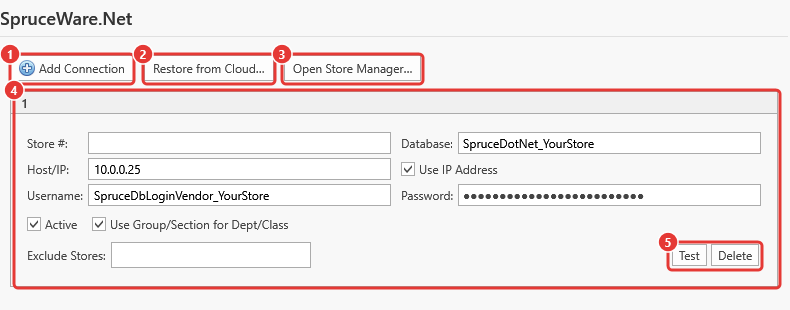
Add Connection - one card per store database.
Restore from Cloud...
Open Store Manager...
The connection card - Store #, Host/IP, Database, Username, Password, Active, Use Group/Section for Dept/Class, Exclude Stores.
Test / Delete.
Margin Master connects to your Spruce database using the details on the connection card.
It retrieves your inventory and sales data.
The data is loaded into Margin Master's database.
From there, the standard main table build joins your POS data with vendor catalog data.
Department and Class
Each connection card has a Use Group/Section for Dept/Class checkbox that chooses where Margin Master's Department and Class come from:
- Group and Section - Margin Master builds the Class from your Spruce Group and the Department from your Spruce Section.
- Class and Department - the Spruce Class and Department fields are used as they are.
If your Department and Class look wrong after an import, change the checkbox on that store's card, save, and import again - or ask Margin Master support to confirm the right setting for your Spruce data.
Tips
Spruce imports require network access to your Spruce database. Make sure the VPN tunnel is up and that ECI has enabled Margin Master's access to your database before importing.
Configure your Spruce connection in Options > Spruce/RockSolid tab. You will need the server address, database name, and credentials.
If your store uses Class and Department instead of Group and Section for categorization, change the Use Group/Section for Dept/Class setting on your connection card (see above).
Common Questions
Q: Why does Spruce not use a file like other POS systems? A: Spruce connects directly to your POS database over the network, which gives Margin Master access to the most current data without requiring manual file exports.
Q: My Spruce import is failing with a connection error. What should I check? A: Verify that (1) the VPN tunnel to ECI is up and the Spruce server is reachable from this machine, (2) the connection settings in Options are correct, and (3) ECI has enabled Margin Master's access to your database (ECI can confirm this). Then click Test on the connection card.
Q: What is the difference between Spruce and RockSolid Max? A: Spruce reads directly from your Spruce database. RockSolid Max imports from an export file. The data Margin Master builds from is the same; only the source is different.